



Lez#
The Lez at Lattes is a French catchment, located on the Lez River near the town of Lattes, in the Occitanie region. It is a small catchment that is well-suited for modeling using a low-complexity approach.
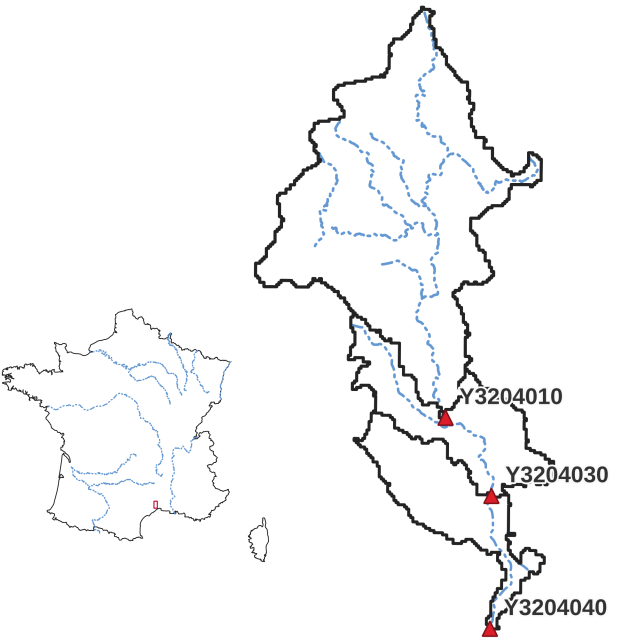
Before starting any tutorial on this dataset, we need to download all the required data listed below:
If the download was successful, a file named Lez-dataset.tar should be available. We can switch to the directory where this file has been
downloaded and extract it using the following command:
tar xf Lez-dataset.tar
Now a folder called Lez-dataset should be accessible and contain the following files and folders:
France_flwdir.tifA GeoTiff file containing the flow direction data,
gauge_attributes.csvA csv file containing the gauge attributes (gauge coordinates, drained area and code),
prcpA directory containing precipitation data in GeoTiff format with the following directory structure:
%Y/%m(2012/08),
petA directory containing daily interannual potential evapotranspiration data in GeoTiff format,
qobsA directory containing the observed discharge data in csv format,
descriptorA directory containing physiographic descriptors in GeoTiff format.
Flow direction#
The flow direction file is a mandatory input in order to create a mesh, its associated drainage plan \(\mathcal{D}_{\Omega}(x)\), and the localization on the mesh of the gauging stations that we want to model. Here,
the France_flwdir.tif contains the flow direction data on the whole France, at a spatial resolution of 1km² using a Lambert-93 projection
(EPSG: 2154). smash is using the following D8 convention for the flow direction.

Note
The flow directions should not contain sink(s), i.e., consecutive cells flowing toward each other. It is therefore important to ensure that flow directions are consistent from upstream to downstream.
Gauge attributes#
To create a mesh containing information from the stations in addition to the flow direction file, gauge attributes are mandatory. The gauge
attributes correspond to the spatial coordinates, the drainage area and the code of each gauge. The spatial coordinates must be in the same unit
and projection as the flow direction file (meter and Lambert 93 respectively in our case), the drainage area in square meter (or square kilometer but it will need
to be converted later). The gauge code can be any code that can be used to identify the station. The gauge_attributes.csv file has been
filled in to provide this information for the 3 gauging stations of the Cance catchment.
Note
We don’t use the csv file directly in smash, we only use the data it contains. So it’s possible to store this dataset in another format as long
as it can be read with Python.
Precipitation#
Precipitation data are mandatory. smash expects a precipitation file per time step whose name contains a date in the following format
%Y%m%d%H%M. The file must be in GeoTiff format at a resolution and projection identical to the flow direction file. Any unit can be chosen
as long as it can be converted into a millimetre using a simple conversion factor (the unit used in this dataset is tenth of a millimetre).
Regarding the structure of the precipitation folder, there is no strict rule, by default smash will fetch all the tif files in a folder
provided by the user (i.e., prcp). However, when simulating a large number of time steps, we recommend sorting the files as much as possible to
speed up access when reading those (e.g., %Y/%m/%d, 2014/09/15).
Note
As you may have seen when opening any precipitation file, the data has already been cropped over the catchment area. This has been done
simply to reduce the size of the files. It is possible to work with files whose spatial extent is different from the catchment area.
smash will automatically crop to the correct area when the file is read.
Potential evapotranspiration#
Potential evapotranspiration data are mandatory. The way in which potential evapotranspiration data processed is identical to the
precipitation. One difference to note is that instead of working with one potential evapotranspiration file per time step, it is possible to
work with daily interannual data, which therefore requires a file per day whose name contains a date in the following format %m%d.
Here, we provided daily interannual potential evapotranspiration data.
Observed discharge#
Observed discharge is optional in case of simulation but mandatory in case of model calibration. smash expects a single-column csv file for each gauge
whose name contains the gauge code provided in the gauge_attributes.csv file. The header of the column is the first time step of the time series,
the data are observed discharges in cubic meter per second and any negative value in the series will be interpreted as no-data.
Note
It is not necessary to restrict the observed discharge series to the simulation period. It is possible to provide a time series covering a larger time window over which smash
will only read the lines corresponding to dates after the starting date provided in the header.
Physical descriptors#
Physical descriptors are mandatory for performing regionalization methods. These descriptors serve as inputs for the descriptors-to-parameters mapping, which allows for constraining the model parameters based on physical characteristics.